Intelligent Trading Ecosystem Official community
CHAINBEY AI / MARKET INTELLIGENCE

AI Chart Engine. More than just price.

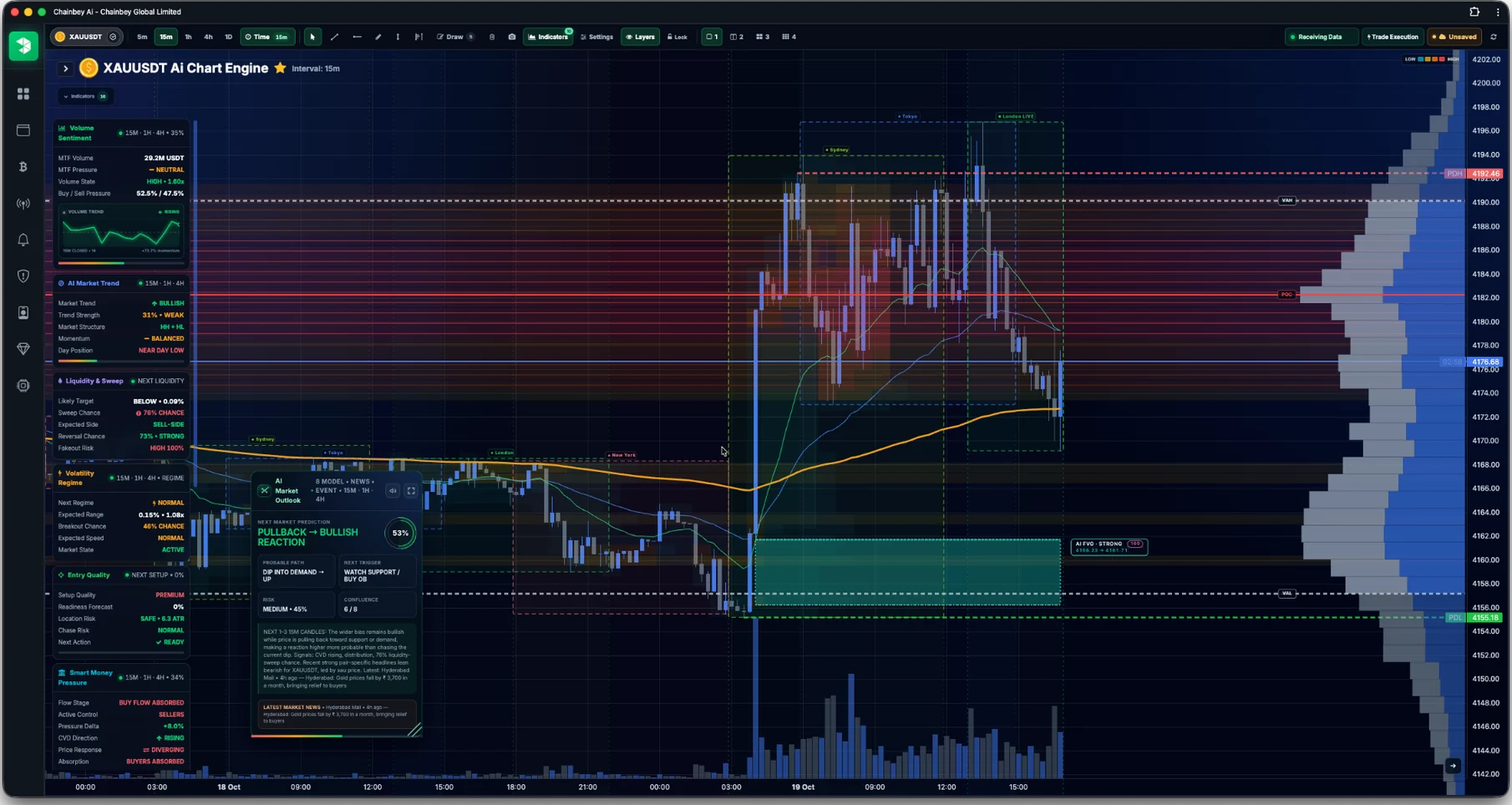
Explore the real Chainbey AI Chart Engine: a complete analytical workspace connecting multi-timeframe charts, volume and liquidity analysis, smart-money pressure, market phases, AI Market Outlook, news context and risk-aware trade decisions. See the actual interface and learn what each intelligence panel explains.

BUILT FOR CONTEXT, CLARITY AND DISCIPLINE
THE REAL CHAINBEY WORKSPACECAPTURED PRODUCT VIEW
Full Chainbey AI Chart Engine workspace with candlestick chart, volume profile, intelligence panels and AI Market Outlook
Actual Chart Engine interfaceCaptured example · not a live market feed
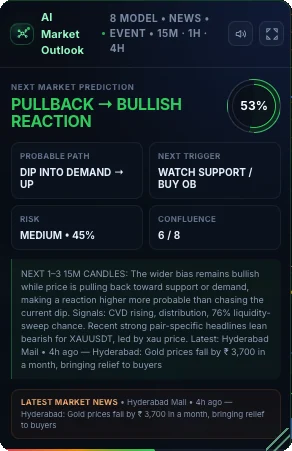
Actual AI Market Outlook panel in the Chainbey Chart Engine showing prediction, trigger, risk and model context
Product interface screenshot · captured example
KEY CHART FEATURE

AI Market Outlook with context.

A unified market outlook combines several analytical models, relevant news, event awareness and multi-timeframe context. Explore scenario direction, confidence, confluence, the probable path and what to watch next. The screenshot is an example reading, not a current trading signal.

Market scenariosRead a likely path and the conditions that might support it.
Model confluenceReview several analytical inputs and how they align.
Next triggerIdentify what structure or price behavior deserves attention.
Risk awarenessUnderstand confidence and limitations before acting.

The image shows a captured example. Probabilities and market states change with conditions; none are guaranteed outcomes.

REAL CHAINBEY CHART ENGINE PANELS

Core intelligence. Actually visible.

Explore the information each part of the workspace presents, from participation and price structure to news and market phases.

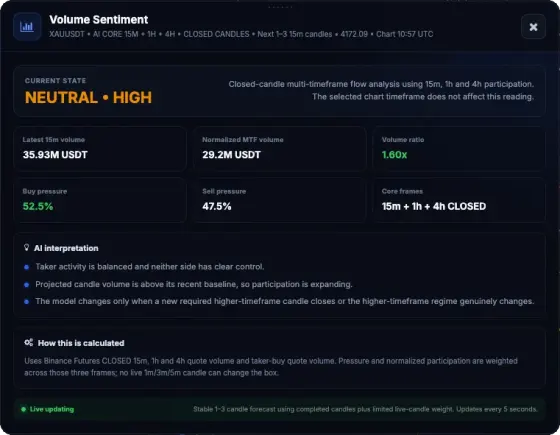
Volume Sentiment interface screenshot showing the Chainbey analysis panel
PARTICIPATION01

Volume Sentiment

Compare buy and sell participation using closed-candle multi-timeframe volume data. Normalized volume, pressure balance and participation intensity help distinguish expansion from quiet conditions.

CHAINBEY INTELLIGENCE LAYER
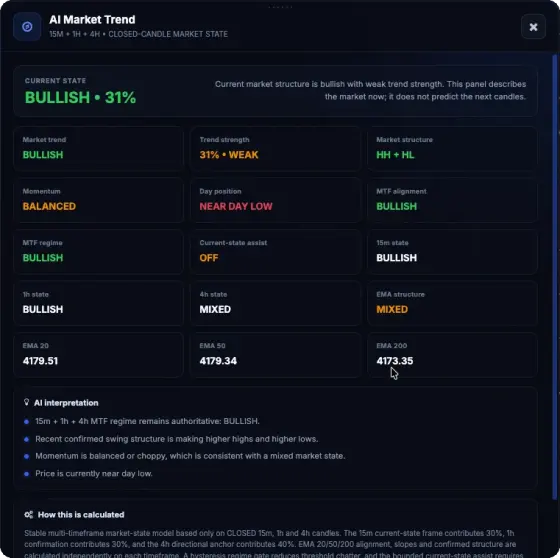
AI Market Trend interface screenshot showing the Chainbey analysis panel
TREND STRUCTURE02

AI Market Trend

Bring market direction, trend strength, structural highs and lows, momentum and higher-timeframe alignment into one readable view. EMA context can add perspective without replacing price structure.

CHAINBEY INTELLIGENCE LAYER
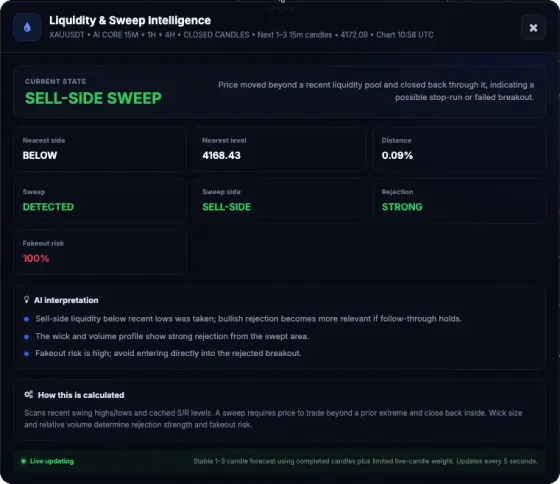
Liquidity & Sweep Intelligence interface screenshot showing the Chainbey analysis panel
LIQUIDITY BEHAVIOR03

Liquidity & Sweep Intelligence

Locate the nearest liquidity pool, spot potential buy-side or sell-side sweeps and review rejection characteristics. The panel explains why a breakout or stop-run requires confirmation.

CHAINBEY INTELLIGENCE LAYER
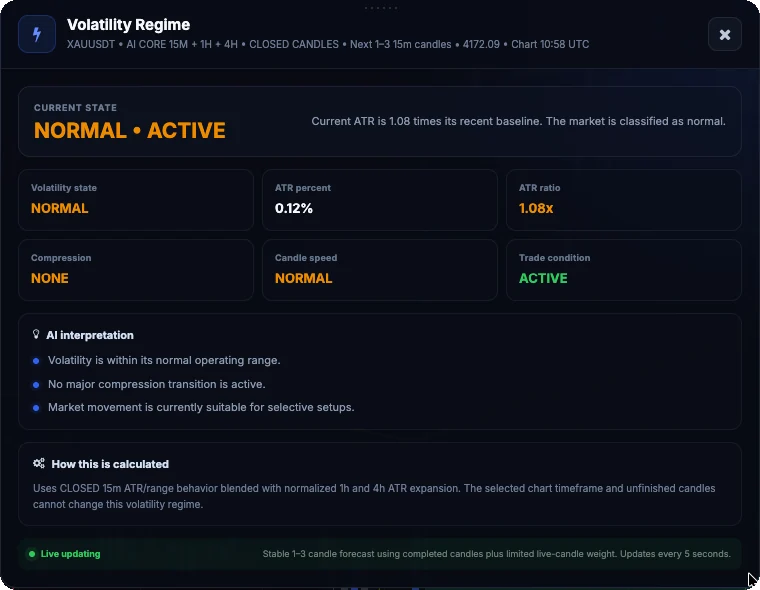
Volatility Regime interface screenshot showing the Chainbey analysis panel
MARKET CONDITIONS04

Volatility Regime

Understand whether volatility is compressed, normal or expanding using ATR-based context. Read candle speed, volatility ratio and current trading conditions before choosing an approach.

CHAINBEY INTELLIGENCE LAYER
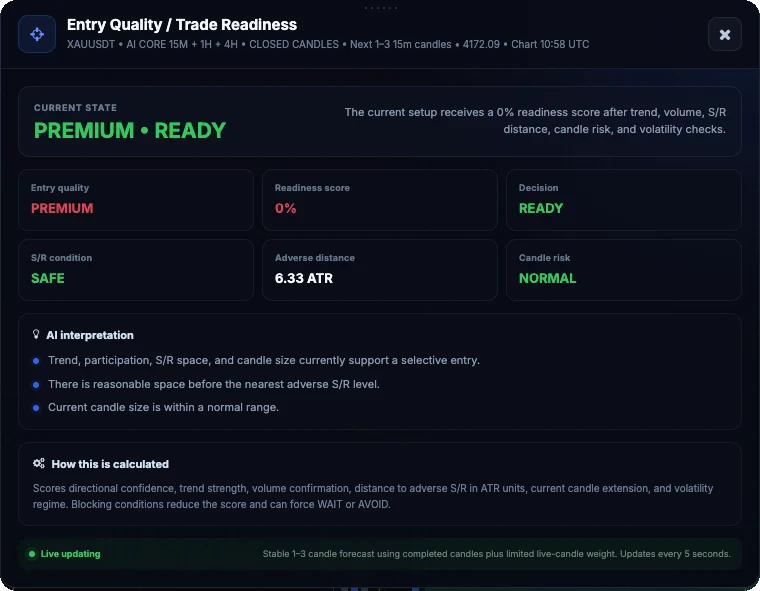
Entry Quality / Trade Readiness interface screenshot showing the Chainbey analysis panel
TRADE FILTERS05

Entry Quality / Trade Readiness

Review setup quality alongside risk factors such as distance to nearby support or resistance, adverse movement potential and current candle extension. A readiness label is not a guarantee.

CHAINBEY INTELLIGENCE LAYER
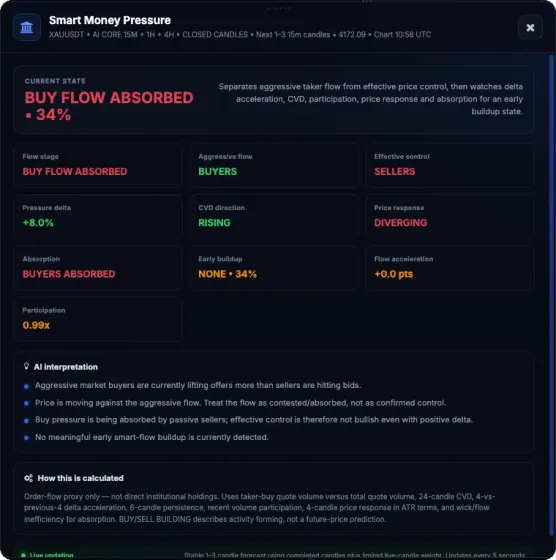
Smart Money Pressure interface screenshot showing the Chainbey analysis panel
ORDER-FLOW PROXIES06

Smart Money Pressure

Distinguish aggressive taker flow from effective price control. Study pressure delta, CVD direction, absorption and participation to understand whether buyers or sellers are actually gaining traction.

CHAINBEY INTELLIGENCE LAYER
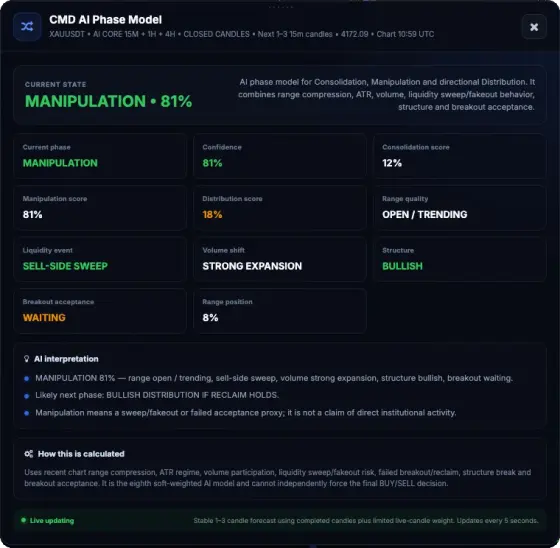
CMD AI Phase Model interface screenshot showing the Chainbey analysis panel
PHASE ANALYSIS07

CMD AI Phase Model

Read consolidation, manipulation-like sweep behavior and directional distribution as a probability-based phase framework. The model combines range structure, volume, ATR and breakout acceptance.

CHAINBEY INTELLIGENCE LAYER
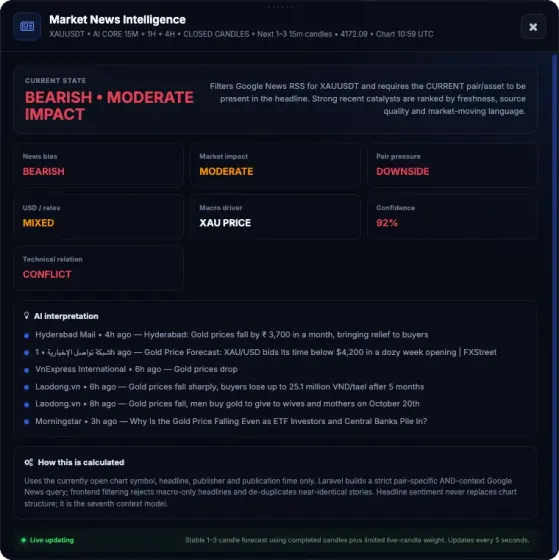
Market News Intelligence interface screenshot showing the Chainbey analysis panel
NEWS CONTEXT08

Market News Intelligence

Pair-specific headlines are filtered for relevance, timing and potential market impact. Compare reported news bias with technical structure rather than treating headlines as automatic trade triggers.

CHAINBEY INTELLIGENCE LAYER
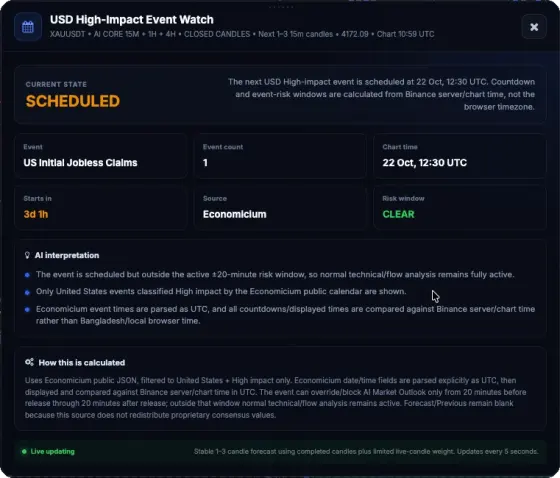
USD High-Impact Event Watch interface screenshot showing the Chainbey analysis panel
ECONOMIC EVENT RISK09

USD High-Impact Event Watch

Monitor upcoming high-impact United States economic releases, their scheduled UTC times and the remaining countdown. Event-risk windows help you recognize when macro news may interfere with technical setups; the captured schedule is historical, not a live calendar.

CHAINBEY INTELLIGENCE LAYER
MAKE THE WORKSPACE YOURS

Tools & Customization.

Customize your analysis with real Chart Engine indicator panels, technical settings, preferred timeframes and drawing tools.

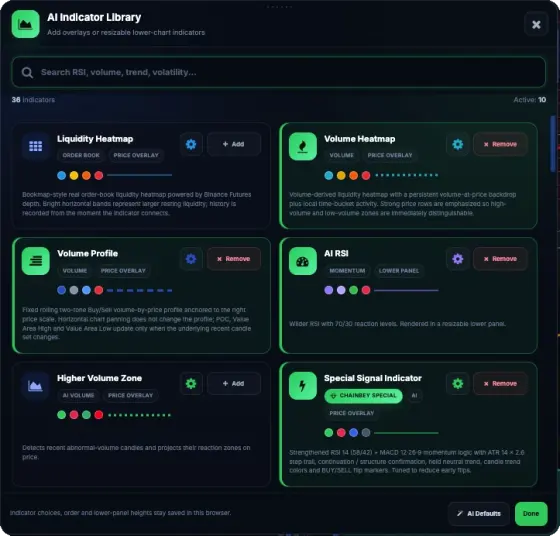
AI Indicator Library — actual Chart Engine interface showing available controls View actual interface
INDICATORS & OVERLAYS
01 / 04

AI Indicator Library

Browse and configure the built-in indicators, including volume heatmap, volume profile, AI RSI and special Chainbey signal overlays. Choose the tools relevant to your strategy and manage chart placement from one searchable library.

AVAILABLE IN CHAINBEY CHART ENGINE
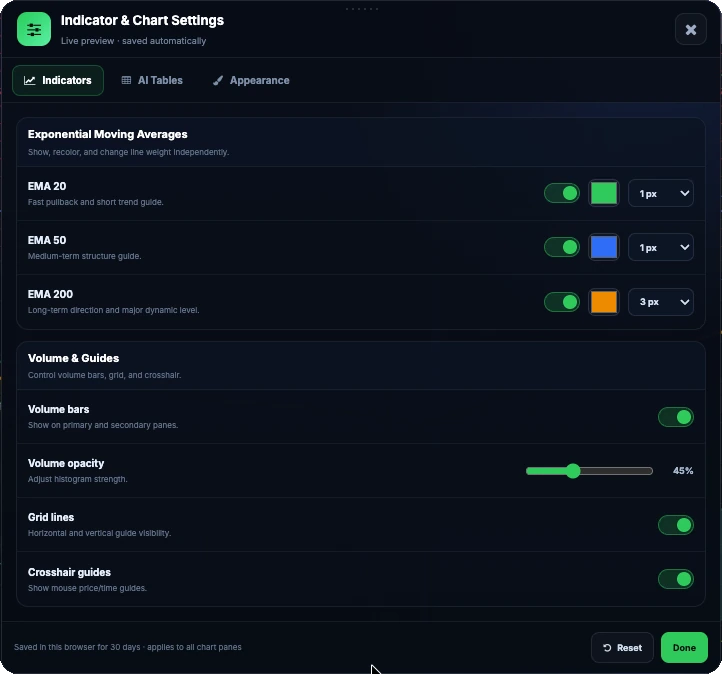
Indicator & Chart Settings — actual Chart Engine interface showing available controls View actual interface
WORKSPACE CUSTOMIZATION
02 / 04

Indicator & Chart Settings

Personalize the technical workspace: turn exponential moving averages on or off, choose their colors and widths, adjust volume bars and opacity, and manage grid lines and crosshair guides. Your selected settings can be retained for your next visit.

AVAILABLE IN CHAINBEY CHART ENGINE
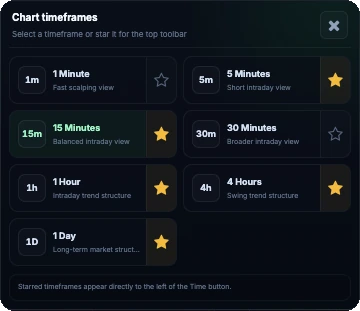
Chart Timeframes — actual Chart Engine interface showing available controls View actual interface
MULTI-TIMEFRAME VIEW
03 / 04

Chart Timeframes

Quickly switch between intraday and longer-term views such as 1m, 5m, 15m, 30m, 1h, 4h and 1D. Star frequently used timeframes to keep the most relevant intervals within reach.

AVAILABLE IN CHAINBEY CHART ENGINE
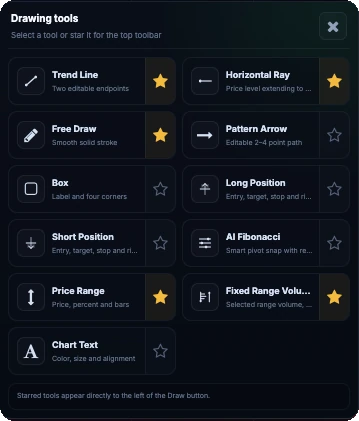
Drawing Tools — actual Chart Engine interface showing available controls View actual interface
CHART ANNOTATION
04 / 04

Drawing Tools

Annotate price action with editable trend lines, rays, free drawing, pattern arrows, position tools, AI Fibonacci, price ranges and chart text. Pin your preferred drawing tools to the top toolbar for a more efficient chart review.

AVAILABLE IN CHAINBEY CHART ENGINE
Tools are configurable inside your chart workspace. These screenshots show an example configuration; individual settings and available features can vary.
Multi-TFTimeframe analysis
10 panelsMarket intelligence views
VisualContext-driven decisions
WHAT YOU CAN EXPLORE

Analysis built into the chart.

Read connected market signals without switching between scattered tools.

01

Multi-timeframe perspective

Study price behavior and trend alignment across chart timeframes while keeping the decision context anchored to your working view.

02

Liquidity and sweeps

Visualize liquidity areas, potential sweeps and price reactions near important trading levels.

03

Volume and market pressure

Review volume sentiment, smart-money pressure and related participation clues alongside the actual candles.

04

Volatility and readiness

See changes in market regime, entry quality and trade readiness before considering an entry.

05

Trading overlays

Work with market-structure tools such as fair value gaps, order blocks, support and resistance and custom drawing objects.

06

Saved workspace

Return to chart layouts, indicators and display preferences through your saved workspace configuration.

HOW IT WORKS

From candles to context.

A repeatable reading sequence can help organize your chart analysis.

REPEATABLE WORKFLOW
01

Choose your market

Open a supported symbol and timeframe to begin a structured review.

02

Study structure

Compare trend, volatility, key levels and liquidity behavior in the same chart.

03

Review AI panels

Use the six intelligence tables and current decision context to evaluate whether conditions align.

04

Manage your view

Apply overlays, draw annotations and save your preferred workspace.

GOOD TO KNOW

Questions, answered.

Understand the capability and its limitations before using it.

Does the chart engine automatically tell me when to buy or sell?

It provides analytical context and decision support. A signal or AI decision does not remove risk or replace your judgment.

Can I use several indicators on the same chart?

Supported overlays and indicators can be configured within the workspace, including below-chart indicators when available.

EXPLORE THE ECOSYSTEM

Intelligence works better together.

Discover how other Chainbey tools connect to your trading workflow.

CONTINUE WITH CHAINBEY

Discover your next step.

Explore Chainbey services or choose the access that fits your needs.

View membership